Q3 2025
Course page updates
We've made improvements to our course pages, in line with our new learning journeys - making it easier for learners to start learning and view learning progress. We're also making it simpler for you to choose what to learn next, by showing which learning journeys this course appears in. Finally, we've added 'Level up your skills' at the end of each course - helping learners to find complementary resources such as practice systems and live sessions.
PDF export for badge sharing
The options for badge sharing now include PDF export, making it easier for you to share your achievements.
Improved live sessions time display
We no longer base times on GMT (for example, 10:30 GMT+8) and now use time zone identifiers (for example, 10:30 Europe/Madrid), based on your location. This change makes the time format clearer.
SAP Certification improvements
- Our Certification page now features "Recommended steps to prepare for the exam" resources - giving you a clear path to get ready for your exam. As part of this update, standalone courses, instructor-led trainings, and practice systems, can be displayed as enablement resources.
- Certification overview pages clearly outline the skills that you'll demonstrate when achieving this certification.

User and license management
- License managers can now assign licenses to specific SAP S-user IDs, regardless of whether the user ID is linked to the customer's global ultimate account set-up. This change significantly simplifies the license assignment process for partners in particular.
- When the license manager provides an SAP user ID, the system will check if the e-mail of the SAP user ID matches the e-mail listed in the user upload file. This change helps customers to govern their licenses and ensure that licenses are assigned to the correct SAP user IDs.
- Help documentation for the license managers is now available in the SAP Learning help center at SAP Learning Hub administration.
- You can now upload CSV files in the user and license management UI, separated by either ";" or ",". With this change, license managers in multiple regions don't need to adjust the regional settings in Excel to create the file.
SAP Learning Hub analytics dashboard
- New bookmark feature in "Explore and Export Data": You can now save personalized states of all views in the "Explore and Export Data" section. This means you can quickly return to pre-filtered or customized views of your data without having to re-apply all the settings, streamlining the reporting process and improving efficiency.
When you create a bookmark, it captures:- Filter states: values for all applied filters.
- Table structure: The current drill-down levels in tables, along with any sorting, ranking, and visibility settings for columns and rows.
To create a bookmark, navigate to Tools > Bookmark > Bookmark Current State

To open: Navigate to Tools > Bookmark > Open Saved Bookmark and select your saved view.
You can set one of your private bookmarks to load automatically every time you open the Explorer, giving you immediate access to your most-used view.
Any bookmark you create is private, meaning it's visible only to you and won't affect the default story view for other users.
Learn more: For detailed information on this standard SAP Analytics Cloud feature, refer to the official SAP Analytics Cloud documentation on creating and using bookmarks.
- Consolidated help resources on new "SAP Learning Hub administration help center" page
We've updated the "Learn More" button to redirect you to a single, centralized location for help documentation, ensuring you always have access to the most up-to-date information.
To improve your support experience, we've replaced our collection of separate resources (such as FAQs and release notes in PDF format) with a comprehensive, easy-to-navigate web page: SAP Learning Hub administration help center. This page centralizes all key administrative information, making it easier to find answers and stay informed about product updates.
- New fields: SAP Universal ID country/region and SAP Universal ID SAP region (learning activities)
We've extended the learning activities views in the "Explore and Export Data" section to include geographical fields that were previously only available for certification reporting. This enhancement allows consistent geographical analysis across different data sets.- SAP Universal ID country/region: shows the country associated with a user's SAP Universal ID record.
- SAP Universal ID SAP region: shows the SAP-defined geographical region (e.g. APJ, EMEA) associated with the country specified in user's SAP Universal ID record.
Note
Geographical region assignments are regularly updated.
- Extended “Learners” view
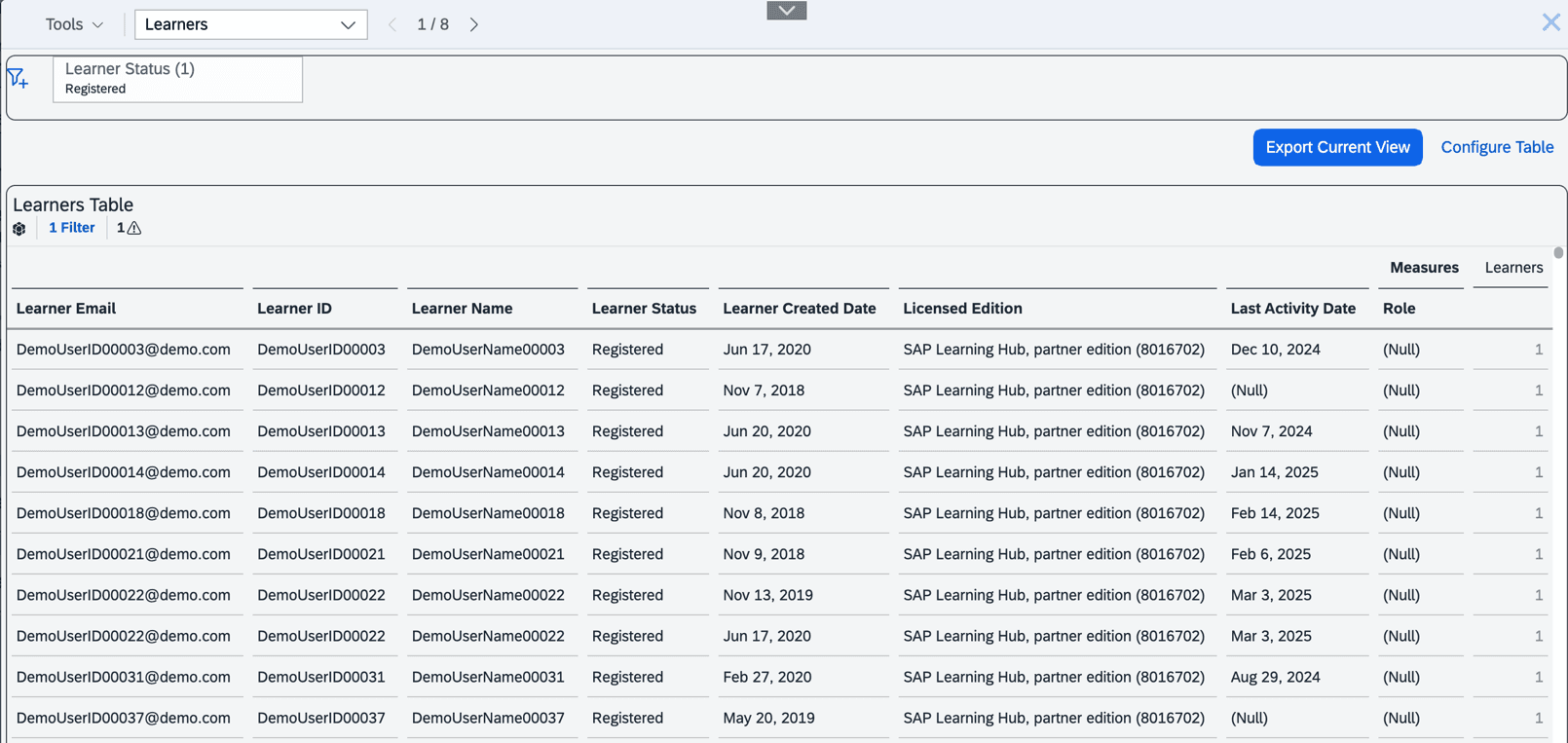
We’ve expanded the “Learners” view in the “Explore and Export Data” section to include all license managers and learning analysts, besides all licensed learners. This gives visibility into users involved in license management and analytics, even if they don’t hold an active SAP Learning Hub license.
The new field “Role” includes:- License manager: can manage licenses and custom fields in the license management UI.
- Learning analyst: can access the SAP Learning Hub analytics dashboard and export/analyze data.
The new field is hidden by default. To use it, add the role dimension via the “Configure Table” button or in your filters within “Explore and Export Data”.
Note
Users with administrative roles may not have an SAP Learning Hub license, so license-related fields may be empty. The Role field is populated only for users with administrative roles.
- Dashboard notification on data loads
To prevent confusion during data loading, the dashboard now shows the data refresh status. While the notice is shown, some metrics may be temporarily out of date. Once the data load is completed, a status indicator in the top-right confirms this.

- Status display for standalone courses
We’ve resolved a temporary issue which caused the "Completed' status for some standalone courses to be misreported. All statuses are now displayed correctly in the dashboard. As the data refreshes, you may notice updates to status counts or visuals.
- Improved "Estimated Hours" rounding and aggregation accuracy
We've resolved issues related to rounding and status-based aggregation of estimated hours. As a result, you may notice slight changes in previously reported estimated hours. This update improves accuracy and consistency across the dashboard and exports.